Abonnement
S’abonner, changer d’offre, corriger le paiement et l’accès en lecture seule.
Abonnement est par Organisation. Les Owners l’ouvrent depuis Configuration (ou depuis Facturation en cliquant une ligne).
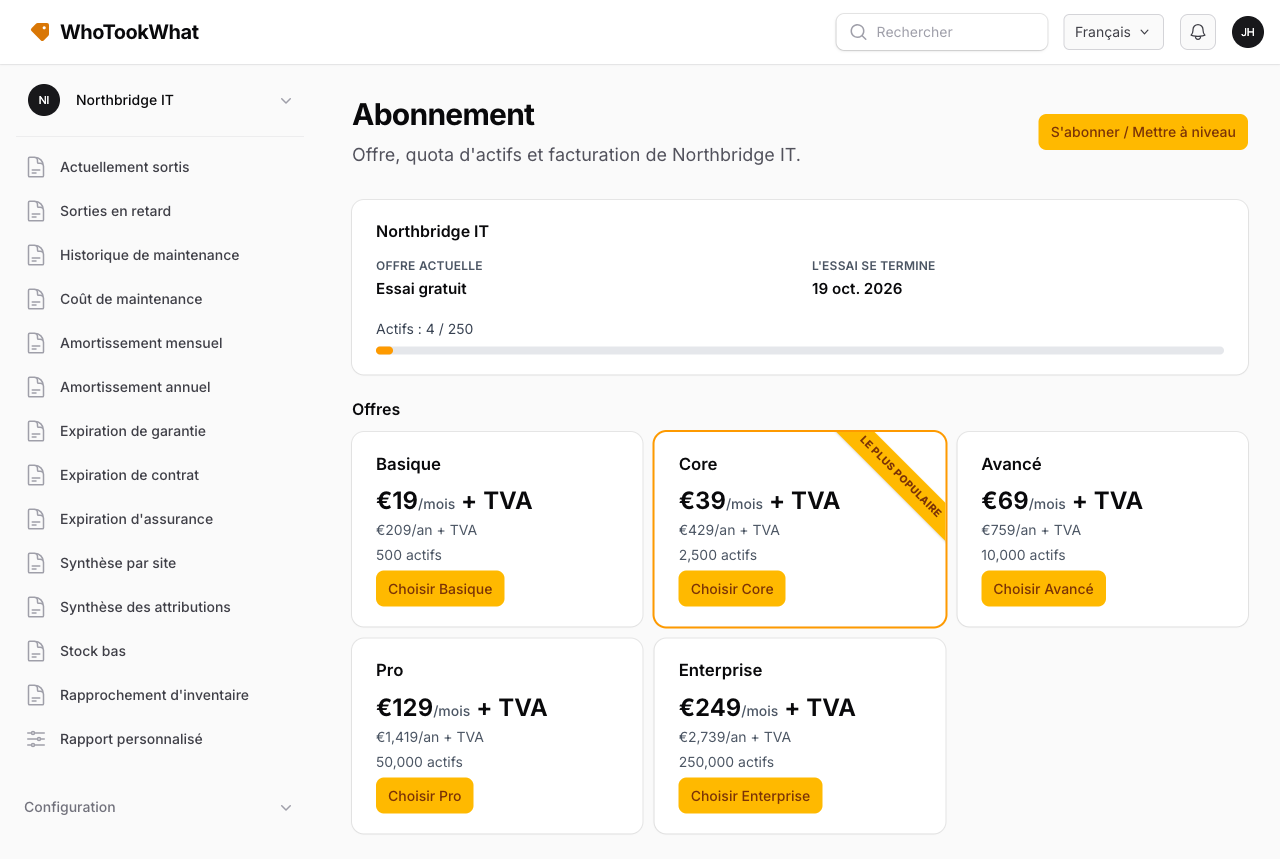
S’abonner ou changer d’offre
Choisissez une offre et une facturation mensuelle ou annuelle. Le paiement passe par Stripe avec la devise par défaut de l’Organisation. Si un essai WhoTookWhat est encore en cours, Stripe enregistre la carte maintenant et commence la facturation à la fin de cet essai (leur page indique Start trial pour cette raison). Stripe collecte une adresse de facturation et calcule la taxe. Les pages marketing affichent encore « + TVA » sur en-GB, DE, ES et FR ; le montant facturé vient de Stripe Tax.
Un code promo court facultatif (lettres et chiffres, sans voyelles) applique un pourcentage de remise pendant un nombre de mois, ou pour toute la durée de l’abonnement. Chaque code peut être limité à des offres nommées (par exemple Core seulement). Saisissez le code et cliquez Appliquer pour voir la remise sur le calculateur ; rouvrir S’abonner / Mettre à niveau conserve ce code. Un code à 100 % à vie sur une offre listée l’active ici sans Stripe Checkout. Les autres codes s’appliquent au premier paiement, pas lorsque vous changez d’offre.
Si cette Organisation a déjà un abonnement Stripe qui peut être échangé, WhoTookWhat met à jour cet abonnement au lieu d’ouvrir un second Checkout. Un abonnement en retard doit d’abord être corrigé. Un paiement incomplet peut être relancé.
Paiement échoué
Si un paiement échoue, l’Organisation reste sur son offre pendant 7 jours. Une bannière affiche l’échéance. Ensuite, ou si Stripe marque l’abonnement impayé ou annulé, l’Organisation passe en lecture seule.
Vous pouvez encore lire le registre. Les ajouts, modifications et suppressions sont bloqués jusqu’à ce que vous vous abonniez ou mettiez à jour la carte.
Annuler
Annulez depuis le portail de facturation Stripe (ouvert depuis Abonnement). L’accès continue pendant la période déjà payée.
Transférer la propriété
Les Owners peuvent transférer cette Organisation à un membre déjà présent. La liste n’inclut que les membres actuels — invitez d’abord quelqu’un depuis Membres s’il n’y est pas.
Le membre devient Owner et peut gérer la facturation. Vous devenez Manager et perdez Abonnement. Stripe reste sur cette Organisation ; le nouvel Owner peut mettre à jour la carte dans le portail de facturation.
Essai terminé
Après l’essai partagé de 30 jours, chaque Organisation que vous avez créée est en lecture seule jusqu’à ce que cette Organisation soit abonnée. Voir Essai et offres.